AT&T Visual Voicemail
- 3.3
- Rating
- 10.00M
- Installs
- Free
- Price

 Analysis by App-foxy
I find voicemail easiest to deal with when it behaves less like a phone menu and more like an inbox. That is the basic appeal of AT&T Visual Voicemail: it is a communication app from AT&T Services, Inc. that puts voicemail messages into a visual interface instead of making me call a mailbox and listen through every item in sequence. For an AT&T customer whose phone supports it, that change can make missed calls much easier to sort out.
My experience with the app is less about discovering a large collection of tools and more about removing a familiar nuisance. I can see which messages are waiting, decide which one matters, and deal with it in the order that makes sense to me. That is particularly useful when I am in a hurry, when a caller has left a long message, or when listening to several messages in a row would be tiring.
It is free, rated for Everyone, and belongs in the communication category. The app has reached over ten million installs, while its average rating sits at 3.2 from around twenty-two thousand ratings. Those figures suggest a product with a broad audience but also a noticeable amount of user frustration. I think that is a fair starting point: the concept is genuinely convenient, but the experience depends heavily on the phone, account, network, and voicemail setup around it.
You May Also Like

 Blood Strike: 2.5 Anniversary
Blood Strike’s Loadouts Turn Every Drop Into a Tactical Gamble
A close look at Blood Strike’s custom loadouts: how fast access to signature weapons reshapes its battle royale rhythm, rewards preparation, and narrows the gap between fights.

 Pandora - Music & Podcasts
Pandora’s Music Is Easy to Start, but Harder to Recover
Pandora’s strength is its low-effort path from a seed to a station. Its weak spot is how much confidence it asks you to place in connection, setup, and quiet recovery.

 8 Ball Pool
 Is Built on Rivalries, Rematches, and Routine
A close look at the rivalries, rematches, shared routines, and unanswered safety questions that turn a quick pool match into a persistent mobile community.

 Samsung Music
’s Quiet Strength Is Playing What You Already Own
Its reach comes less from spectacle than from dependable access to a personal library. That simplicity is both the app’s strongest retention engine and its ceiling.

 AccuWeather: Weather Radar
AccuWeather Review: A Quick, Clear Forecast for Everyday Decisions
For everyday plans, the best forecast is the one you can understand quickly. AccuWeather makes rain timing, radar, and local conditions easy to act on, with a few trade-offs.

 Hill Climb Racing
Why Hill Climb Racing Still Turns Crashes Into One More Run
A tiny car, a bumpy hill and one more upgrade: Hill Climb Racing keeps resurfacing because its simple chaos makes every near-miss feel personal.
More From Our News Desk



How the visual inbox affects readability and navigation
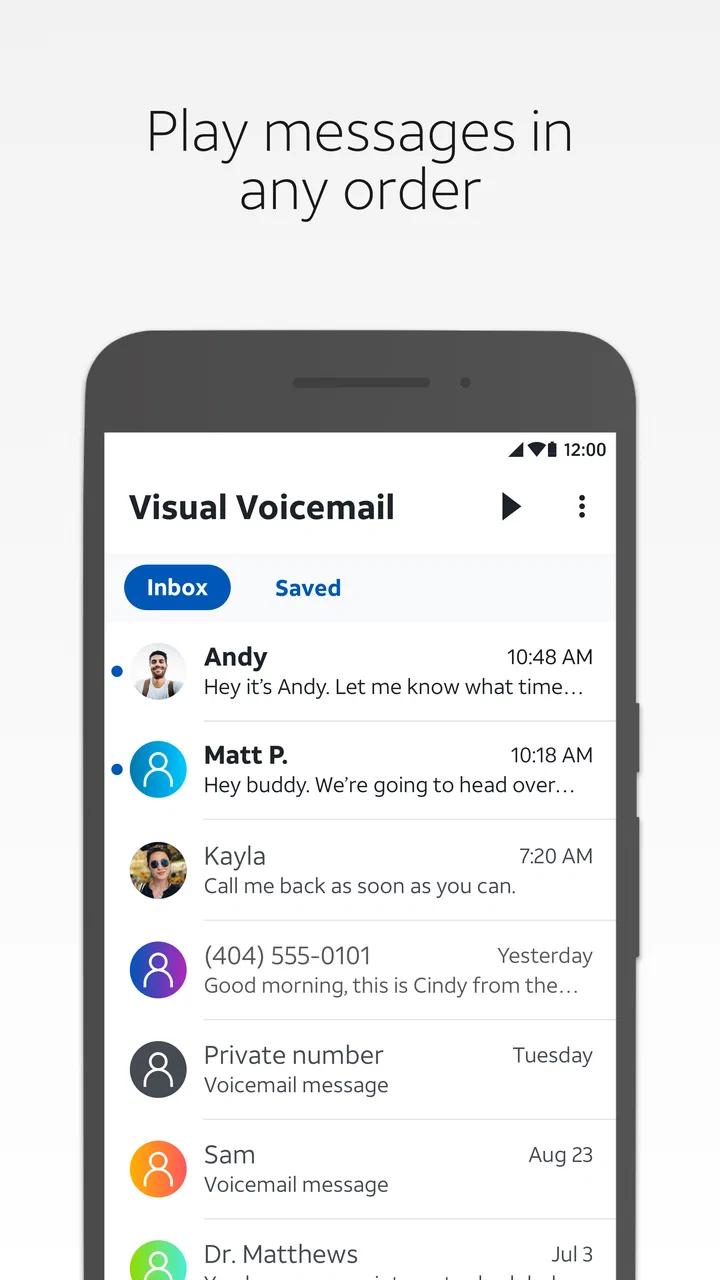
The most important improvement is the shift from an audio-only workflow to a screen-based one. A traditional voicemail system asks me to remember prompts, wait through messages, and choose actions by listening carefully. A visual voicemail screen gives me a more direct overview. I can identify the message I want before pressing play, which reduces unnecessary listening and makes it easier to return to a particular caller.
That matters for more than convenience. Someone who has difficulty retaining spoken instructions may find a visible message list easier to understand than a sequence of numbered voice prompts. The same is true for a person working in a noisy place, where an automated phone menu can be hard to follow. Being able to look at the screen first gives the task a clearer structure.
I also appreciate the control this approach gives me over attention. If I receive several messages, I do not have to process them in the order the system presents them. I can start with a family member, a doctor’s office, or a work contact and leave less urgent messages for later. That small choice can make voicemail feel manageable rather than like a queue I have to endure.
Where the interface helps in everyday use
A realistic example is arriving home after a shift with several missed calls. Instead of calling voicemail while carrying groceries and trying to remember which message came first, I can open the app, scan the list, and play only the messages that need an immediate response. If one caller left a vague message, I can listen again without having to navigate through unrelated recordings first.
This workflow can also help people who communicate better through visual organization. The app does not turn voicemail into text, so listening is still central, but the surrounding task becomes easier to plan. The visual list acts as a reminder that a message exists, which is useful when I cannot listen immediately.
For older users or anyone who prefers uncomplicated software, the narrow purpose is a strength. There are no social feeds, chat threads, or distracting extras competing for attention. The app is focused on voicemail. That said, a focused app still needs clear labels and predictable controls, and the quality of that experience can vary with the device and service configuration.
What I would check before relying on it
I would not assume that installing the app alone guarantees a complete voicemail experience. Because this is an AT&T service app, its usefulness is tied to an AT&T mobile setup that supports the feature. Before moving all voicemail habits into it, I would place a test call from another phone, leave a short message, and confirm that the message appears and plays correctly.
That test is especially important for someone who depends on voicemail for appointments, work, or family care. It is better to discover a setup issue with a harmless test message than with an urgent call. I would also keep the regular phone voicemail route in mind as a fallback until the visual inbox has proven reliable on that particular device.
The current version is 4.19.0.10243, and the app requires at least OS 10. I would check the phone’s operating-system compatibility before troubleshooting the app itself. A person using an older phone may spend time changing settings when the real limitation is simply that the device does not meet the minimum requirement.
Motor, sensory, and situational considerations
Visual voicemail can reduce the number of steps involved in handling messages, which is helpful for people who find long sequences of keypad presses difficult. Instead of listening for a prompt, waiting for the right moment, and pressing a number accurately, I can generally work from the visible message list. That can be more comfortable for someone with limited dexterity or difficulty coordinating quick button presses.
It is also useful when holding a phone to the ear is uncomfortable or impractical. I can look at the screen before deciding whether a message deserves attention. In a shared room, that discretion is valuable: I may be able to identify the caller without immediately playing audio aloud. I still need to manage sound privately, but the first step does not require broadcasting a voicemail menu.
For people with hearing-related needs, the app’s visual organization may make voicemail easier to locate and manage, but it should not be mistaken for a text transcription service. The message itself remains an audio recording. If understanding spoken audio is difficult, the visual list helps with selection and organization, not with converting the caller’s words into readable text.
That distinction is one of the most important practical trade-offs. Someone who needs written voicemail content should look for a carrier feature or separate service that explicitly provides transcription. I would not choose this app as a complete solution for that need. Its value is visual control over voicemail, not replacement of the audio message with text.
Reducing effort without removing every obstacle
There is a useful difference between reducing effort and making a task universally accessible. The app can make message selection easier, but I still have to see the screen, understand the controls, and hear the recording unless another phone-level option helps. A person with low vision may benefit from the larger structure of a visual inbox while still needing the device’s own text-size, contrast, or screen-reader settings.
I would approach those settings as part of the overall experience rather than assuming the app solves them by itself. Increasing system text size may improve readability, but it can also make some interfaces feel crowded. A user who relies on spoken screen feedback should test whether the message list and playback controls are announced in a useful order. If navigation becomes confusing, the regular voicemail route may be less frustrating for that individual.
Motor access also depends on how much precision the screen demands. A person with tremors or limited reach may prefer to use the phone with a stand, a stylus, voice control, or another established device aid. The app’s visual approach can reduce repeated keypad interaction, but it does not eliminate the need to tap and select items.
When visual access is better than calling voicemail
There are several situations where I would choose this app over the usual phone-based alternative. In a quiet waiting room, I can review the list without speaking to an automated system. During a busy day, I can postpone nonessential messages instead of losing track of them in a long audio sequence. When a message is important but unclear, I can return to that specific recording rather than replaying everything before it.
It can also help when attention is divided, although I would avoid playing messages while driving or doing anything that makes phone use unsafe. The visual list is useful before or after the task, not a reason to interact with the phone in a dangerous situation. In that sense, the app supports better planning, but it does not remove normal safety boundaries.
For a caregiver or family member helping someone manage calls, the visible structure may be easier to explain than a hidden set of voicemail prompts. However, voicemail can contain private information, so I would be careful about sharing the phone or leaving messages open on screen. The app makes access convenient, and convenience should be balanced with privacy in shared environments.
Remaining barriers and practical trade-offs
The first barrier is eligibility. This is not a general voicemail manager for every carrier. Its purpose is specifically connected to AT&T voicemail, so a person using another provider should skip it rather than expecting it to replace that carrier’s system. Even an AT&T customer may need a compatible phone and service configuration, which is why a quick test is worthwhile.
The second barrier is reliability in the broader sense. When voicemail does not appear promptly, playback fails, or the list does not reflect a recent call, it can be difficult to tell whether the problem comes from the app, the phone, the network, or the account. A visual interface feels dependable when it is current; when it is not, the visible list can create false confidence.
For that reason, I would not delete every alternative immediately. I would keep the standard voicemail access available and know how to reach it. If an urgent message seems missing, checking voicemail through the normal phone route can help determine whether the issue is presentation rather than the message itself. This is a practical habit, not an indictment of the app, because carrier-linked tools often depend on several connected parts.
The app is also not the best choice for people seeking a unified communications hub. It does not replace text messaging, email, call history, or a full contact-management system. Its narrow focus is helpful when I want voicemail handled cleanly, but limiting when I want all missed-call activity in one place.
Another trade-off involves listening. The visual list saves time by helping me choose messages, but it does not make the audio content disappear. Someone who dislikes listening to voicemail will gain only partial relief. A transcription-based alternative may be better if reading is substantially easier than hearing, provided that service is available through the person’s carrier or preferred tool.
Who should use it and who should look elsewhere
I would recommend it to an AT&T customer who wants a simpler way to identify, prioritize, and replay voicemail messages. It is especially suitable for people who find automated voice menus tiring, who need to review messages in a deliberate order, or who often postpone listening until they are in a quieter place.
I would be more cautious for someone with an older device, an uncertain AT&T setup, or a strong need for accurate written transcription. I would also suggest another option to a person who wants advanced filtering across calls, texts, and email. This app is most convincing when the problem is specifically the awkwardness of traditional voicemail, not when the goal is to redesign all communication.
One useful decision rule is simple: if seeing a message list would save you time even though you still plan to listen to the recordings, this app is worth trying. If your main requirement is reading every message, using a different carrier feature or accessibility-focused voicemail service may be the better path.
An inclusive verdict for everyday voicemail
After using it as a focused voicemail tool, I see AT&T Visual Voicemail as a practical accessibility improvement rather than a complete accessibility answer. Its strongest contribution is giving people more control over the order, timing, and privacy of voicemail review. That can make a real difference for users who struggle with audio menus, rushed keypad prompts, noisy surroundings, or the mental effort of processing messages one by one.
Its limitations are equally clear. The recordings remain audio, the app depends on an AT&T-compatible setup, and visual navigation does not automatically solve every motor, sensory, or cognitive barrier. I would test it with a nonessential message, adjust the phone’s own accessibility settings where appropriate, and keep the regular voicemail route available until the workflow feels dependable.
The app has been available since October 13, 2011, and its long presence alongside more than ten million installs shows why the basic idea remains useful. The free price also makes trying it low-risk for an eligible customer. Still, the 3.2 average indicates that convenience alone does not guarantee a smooth experience for everyone.
My final recommendation is therefore specific: use it if you are an AT&T customer who wants a visual way to sort and replay voicemail, especially when traditional menus create unnecessary effort. Skip it if you need transcription, carrier-independent voicemail, or a complete communications dashboard. For the right user, it turns a small but recurring frustration into a more readable and controllable routine, and that is a worthwhile improvement.
FAQs for AT&T Visual Voicemail
01What is AT&T Visual Voicemail and how does it work?
AT&T Visual Voicemail is an app that allows users to view, listen to, and manage their voicemail messages in a visual format on their smartphone. Instead of dialing in, users can see a list of messages and choose which to listen to or delete. This makes managing voicemails more efficient and user-friendly.
02Is AT&T Visual Voicemail compatible with all smartphones?
AT&T Visual Voicemail is designed for use with most Android and iOS devices. However, compatibility may vary depending on the phone model and operating system version. It's important to check if your device is supported and ensure it's running the latest software updates for the best experience.
03Are there any additional costs associated with using AT&T Visual Voicemail?
While AT&T Visual Voicemail is typically included in many AT&T plans at no extra charge, some features or premium services might incur additional fees. It's advised to review your current plan details or contact AT&T customer service to understand any potential charges before using the app extensively.
04Can I use AT&T Visual Voicemail while traveling internationally?
Using AT&T Visual Voicemail internationally depends on your data plan and the availability of mobile data or Wi-Fi. Listening to and managing voicemails might incur roaming charges if you're not connected to Wi-Fi. It's best to check your international plan details and consider using Wi-Fi to avoid unexpected fees.
05How secure is AT&T Visual Voicemail?
AT&T Visual Voicemail is designed with security in mind, but users should ensure their devices are secure by setting strong passwords and keeping their software updated. Be cautious of phishing attempts and never share sensitive information through voicemail. Regularly updating the app will also help maintain security.
Pros
- Easy setup and user-friendly interface.
- Access and manage voicemails via app.
- Playback control and message status updates.
- Organizes voicemails for quick retrieval.
- Supports multiple languages and accessibility.
Cons
- Limited compatibility with non-AT&T devices.
- Requires data plan for full functionality.
- App may occasionally experience sync issues.
- Not all features available on older devices.
- Some users report occasional notification lags.

AT&T Visual Voicemail
Gallery